
Técnica Scripts de cliente WCAG 2.2
SCR32Proporcionar validación en el lado del cliente y añadir el texto de los errores mediante el DOM
En resumen
Cuando un formulario se valida con JavaScript, no basta con marcar los campos erróneos: hay que avisar al usuario de forma perceptible. Esta técnica inserta en el DOM, encima del formulario, una lista de mensajes de error en forma de enlaces al campo afectado y mueve el foco hasta ellos. Beneficia sobre todo a quienes usan lector de pantalla o teclado, y debe combinarse con validación en el servidor si no se puede confiar en los scripts.
Aplicabilidad
Scripts usados con HTML.
Descripción
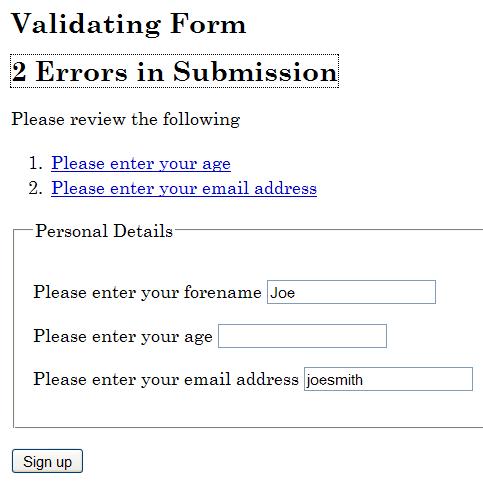
El objetivo de esta técnica es mostrar cómo presentar un mensaje de error cuando falla la validación en el lado del cliente de un campo de formulario. Se usan elementos de anclaje para mostrar los mensajes de error en una lista que se inserta encima de los campos que se van a validar. Los elementos de anclaje se usan en los mensajes de error para que el foco pueda situarse en ellos y así atraer la atención del usuario. El href de los elementos de anclaje contiene un enlace interno de la página que hace referencia a los campos en los que se han detectado errores.
En una aplicación en producción, si JavaScript está desactivado, la validación en el lado del cliente no se producirá. Por tanto, esta técnica solo sería suficiente en situaciones en las que se confíe en los scripts para la conformidad, o cuando también se usen técnicas de validación en el lado del servidor que detecten los errores y devuelvan la página con información sobre los campos erróneos.
Ejemplos
Listar los errores en un bloque al principio del formulario
Este ejemplo valida tanto los campos obligatorios como los campos que requieren un formato concreto. Cuando se detecta un error, el script inserta en el DOM una lista de mensajes de error y mueve el foco hasta ellos.
HTML del formulario
<!DOCTYPE HTML>
<html lang="en">
  <head>
    <title>Form Validation</title>
    <meta charset="utf-8">
    <link href="css/validate.css" rel="stylesheet">
    <script src="scripts/validate.js">
  </head>
  <body>
    <h1>Form Validation</h1>
    <p>The following form is validated before being submitted if scripting
      is available, otherwise the form is validated on the server. All fields are
      required, except those marked optional. If errors are found in the submission,
      the form is cancelled and a list of errors is displayed
      at the top of the form.</p>
    <p>Please enter your details below.</p>
    <h2>Validating Form</h2>
    <form id="personalform">
      <div class="validationerrors"></div>
      <fieldset>
        <legend>Personal Details</legend>
          <div>
            <label for="forename">Please enter your forename</label>
            <input autocomplete="given-name" class="string"
             id="forename" name="forename" type="text" value="">
         </div>
         <div>
            <label for="age">Please enter your age</label>
            <input class="number" id="age" name="age" type="text" value="">
         </div>
         <div>
           <label for="email">Please enter your email address</label>
           <input autocomplete="email" class="email" id="email"
            name="email" type="text" value="">
         </div>
      </fieldset>
      <div>
        <input type="submit" name="signup" value="Sign up">
      </div>
    </form>
    <h2>Second Form</h2>
    <form id="secondform">
      <div class="validationerrors"></div>
      <fieldset>
        <legend>Second Form Details</legend>
          <div>
            <label for="suggestion">Enter a suggestion</label>
            <input class="string" id="suggestion" name="suggestion" type="text" value="">
          </div>
          <div>
            <label for="optemail">Please enter your email address (optional)</label>
            <input autocomplete="email" class="optional email" id="optemail"
             name="optemail" type="text" value="">
          </div>
          <div>
            <label for="rating">Please rate this suggestion</label>
            <input class="number" id="rating" name="rating" type="text" value="">
          </div>
          <div>
            <label for="jibberish">Enter some jibberish (optional)</label>
            <input id="jibberish" name="jibberish" type="text" value="">
          </div>
      </fieldset>
      <div>
        <input type="submit" name="submit" value="Add Suggestion">
      </div>
    </form>
  </body>
</html>
El código JavaScript que realiza la validación e inserta los mensajes de error
window.onload = initialise;
function initialise() {
  var objForms = document.getElementsByTagName('form');
  var iCounter;
  // Attach an event handler for each form
  for (iCounter=0; iCounter<objForms.length; iCounter++) {
    objForms[iCounter].onsubmit = function(){return validateForm(this);};
  }
}
// Event handler for the form
function validateForm(objForm) {
  var arClass = [];
  var iErrors = 0;
  var objField = objForm.getElementsByTagName('input');
  var objLabel = objForm.getElementsByTagName('label');
  var objList = document.createElement('ol');
  var objError, objExisting, objNew, objTitle, objParagraph, objAnchor, objPosition;
  var strLinkID, iFieldCounter, iClassCounter, iCounter;
  // Get the id or name of the form, to make a unique
  // fragment identifier
  if (objForm.id) {
    strLinkID = objForm.id + 'ErrorID';
  }
  else {
    strLinkID = objForm.name + 'ErrorID';
  }
  // Iterate through input form controls, looking for validation classes
  for (iFieldCounter=0; iFieldCounter<objField.length; iFieldCounter++) {
  // Get the class for the field, and look for the appropriate class
  arClass = objField[iFieldCounter].className.split(' ');
  for (iClassCounter=0; iClassCounter<arClass.length; iClassCounter++) {
    switch (arClass[iClassCounter]) {
      case 'string':
        if (!isString(objField[iFieldCounter].value, arClass)) {
          if (iErrors === 0) {
            logError(objField[iFieldCounter], objLabel, objList, strLinkID);
          }
          else {
            logError(objField[iFieldCounter], objLabel, objList, '');
          }
          iErrors++;
        }
      break;
      case 'number':
        if (!isNumber(objField[iFieldCounter].value, arClass)) {
          if (iErrors === 0) {
            logError(objField[iFieldCounter], objLabel, objList, strLinkID);
          }
          else {
            logError(objField[iFieldCounter], objLabel, objList, '');
          }
          iErrors++;
        }
      break;
      case 'email' :
        if (!isEmail(objField[iFieldCounter].value, arClass)) {
          if (iErrors === 0) {
            logError(objField[iFieldCounter], objLabel, objList, strLinkID);
          }
          else {
            logError(objField[iFieldCounter], objLabel, objList, '');
          }
          iErrors++;
        }
        break;
      }
    }
  }
  if (iErrors > 0) {
    // If not valid, display error messages
    objError = objForm.getElementsByTagName('div');
    // Look for existing errors
    for (iCounter=0; iCounter<objError.length; iCounter++) {
      if (objError[iCounter].className == 'validationerrors') {
        objExisting = objError[iCounter];
      }
    }
    objNew = document.createElement('div');
    objTitle = document.createElement('h2');
    objParagraph = document.createElement('p');
    objAnchor = document.createElement('a');
    if (iErrors == 1) {
      objAnchor.appendChild(document.createTextNode('1 Error in Submission'));
    }
    else {
      objAnchor.appendChild(document.createTextNode(iErrors + ' Errors in Submission'));
    }
    objAnchor.href = '#' + strLinkID;
    objAnchor.className = 'submissionerror';
    objTitle.appendChild(objAnchor);
    objParagraph.appendChild(document.createTextNode('Please review the following'));
    objNew.className = 'validationerrors';
    objNew.appendChild(objTitle);
    objNew.appendChild(objParagraph);
    objNew.appendChild(objList);
    // If there were existing error, replace them with the new lot,
    // otherwise add the new errors to the start of the form
    if (objExisting) {
      objExisting.parentNode.replaceChild(objNew, objExisting);
    }
    else {
      objPosition = objForm.firstChild;
      objForm.insertBefore(objNew, objPosition);
    }
    // Allow for latency
    setTimeout(function() { objAnchor.focus(); }, 50);
    // Don't submit the form
    objForm.submitAllowed = false;
    return false;
  }
  // Submit the form
  return true;
	}
  // Function to add a link in a list item that points to problematic field control
  function addError(objList, strError, strID, strErrorID) {
		var objListItem = document.createElement('li');
    var objAnchor = document.createElement('a');
    // Fragment identifier to the form control
    objAnchor.href='#' + strID;
    // Make this the target for the error heading
    if (strErrorID.length > 0) {
      objAnchor.id = strErrorID;
    }
    // Use the label prompt for the error message
    objAnchor.appendChild(document.createTextNode(strError));
    // Add keyboard and mouse events to set focus to the form control
    objAnchor.onclick = function(event){return focusFormField(this, event);};
    objAnchor.onkeypress = function(event){return focusFormField(this, event);};
    objListItem.appendChild(objAnchor);
    objList.appendChild(objListItem);
  }
  function focusFormField(objAnchor, objEvent) {
    var strFormField, objForm;
    // Allow keyboard navigation over links
    if (objEvent && objEvent.type == 'keypress') {
      if (objEvent.keyCode != 13 && objEvent.keyCode != 32) {
        return true;
      }
    }
    // set focus to the form control
    strFormField = objAnchor.href.match(/[^#]\w*$/);
    objForm = getForm(strFormField);
    objForm[strFormField].focus();
    return false;
  }
    // Function to return the form element from a given form field name
    function getForm(strField) {
      var objElement = document.getElementById(strField);
    // Find the appropriate form
    do {
      objElement = objElement.parentNode;
    } while (!objElement.tagName.match(/form/i) && objElement.parentNode);
    return objElement;
  }
  // Function to log the error in a list
  function logError(objField, objLabel, objList, strErrorID) {
    var iCounter, strError;
    // Search the label for the error prompt
    for (iCounter=0; iCounter<objLabel.length; iCounter++) {
      if (objLabel[iCounter].htmlFor == objField.id) {
        strError = objLabel[iCounter].firstChild.nodeValue;
      }
    }
    addError(objList, strError, objField.id, strErrorID);
  }
  // Validation routines - add as required
  function isString(strValue, arClass) {
    var bValid = (typeof strValue == 'string' && strValue.replace(/^\s*|\s*$/g, '')
    !== '' && isNaN(strValue));
    return checkOptional(bValid, strValue, arClass);
  }
  function isEmail(strValue, arClass) {
    var objRE = /^[\w-\.\']{1,}\@([\da-zA-Z\-]{1,}\.){1,}[\da-zA-Z\-]{2,}$/;
    var bValid = objRE.test(strValue);
    return checkOptional(bValid, strValue, arClass);
  }
  function isNumber(strValue, arClass) {
    var bValid = (!isNaN(strValue) && strValue.replace(/^\s*|\s*$/g, '') !== '');
    return checkOptional(bValid, strValue, arClass);
  }
  function checkOptional(bValid, strValue, arClass) {
    var bOptional = false;
    var iCounter;
    // Check if optional
    for (iCounter=0; iCounter<arClass.length; iCounter++) {
      if (arClass[iCounter] == 'optional') {
        bOptional = true;
      }
    }
    if (bOptional && strValue.replace(/^\s*|\s*$/g, '') === '') {
      return true;
    }
    return bValid;
  }
Ejemplo funcional de esta técnica implementado con PHP, JavaScript, CSS y HTML: Form Validation Example (ejemplo de validación de formularios).
Pruebas
Procedimiento
Crear los mensajes de error con etiquetas de anclaje y los scripts adecuados según la técnica anterior.
- Cargar la página.
- Introducir un valor válido en los campos asociados a un mensaje de error y comprobar que no se muestra ningún mensaje de error.
- Introducir un valor no válido en los campos asociados a un mensaje de error y comprobar que se muestra el mensaje de error correcto para el campo.
- Comprobar que los mensajes de error reciben el foco.
- Introducir un valor válido en los campos asociados al mensaje de error mostrado y comprobar que el mensaje de error desaparece.
- Repetir el proceso con todos los campos que tengan asociados mensajes de error creados con etiquetas de anclaje.
Se recomienda repetir también el procedimiento anterior usando una tecnología de asistencia.
Resultados esperados
- Las comprobaciones n.º 2, n.º 3, n.º 4 y n.º 5 son todas verdaderas.
Cómo lo comprobamos en ADDAW
En las auditorías de accesibilidad de ADDAW revisamos cada criterio de conformidad siguiendo este catálogo de técnicas: comprobamos si la web aplica una técnica suficiente y documentamos cada fallo común con capturas y el código afectado, para que el equipo de desarrollo sepa exactamente qué corregir. Los informes siguen la metodología del Observatorio de Accesibilidad y la norma UNE-EN 301 549.
Fuente y licencia
Traducción al español, no oficial, realizada por ADDAW a partir de la técnica SCR32 del documento «Techniques for WCAG 2.2» del W3C (versión del repositorio público del W3C a 22/10/2026). Copyright © W3C® (MIT, ERCIM, Keio, Beihang). Se publica conforme a la licencia de documentos del W3C. El texto normativo de referencia es el original en inglés; si detecta un error en la traducción, escríbanos.




